Back in March, we introduced RunCache as an early beta and asked you to test it in our sandbox or on your own staging environments. Since then, we’ve been iterating based on your feedback, and today, RunCache is now available for beta testing in production.
If you missed the original announcement, here’s a quick overview:
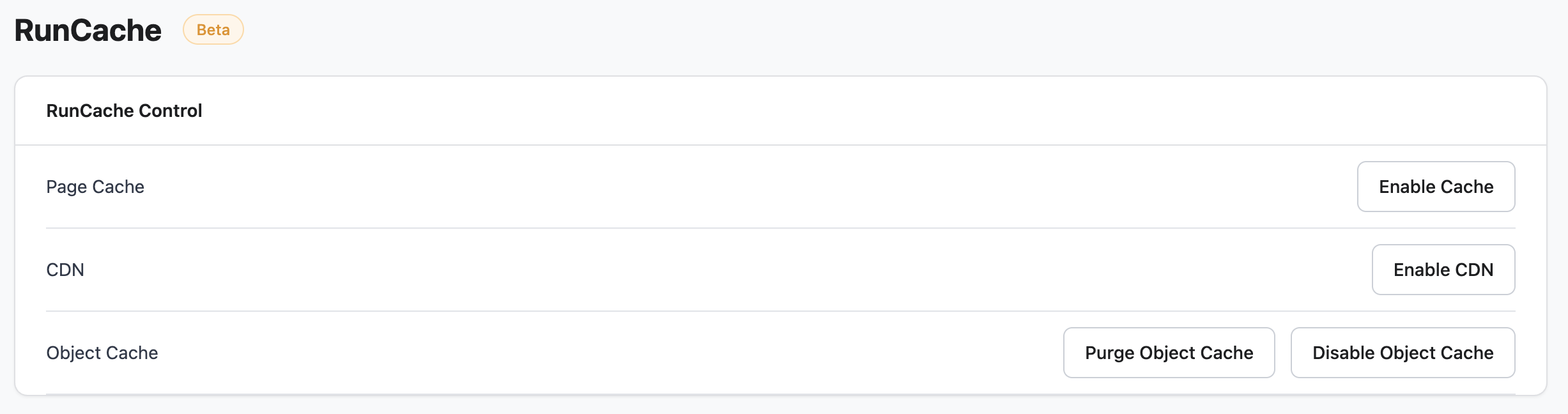
RunCache is the next generation of RunCloud Hub. It’s a unified caching solution for WordPress that combines full-page caching, object caching, and edge caching in a single plugin. Here’s a quick overview of what’s included:
Full-page, object, and edge caching in one plugin: No more relying on multiple caching plugins and server rules. One dashboard, one config.
Smart auto-purging: Cache refreshes automatically on publish/update. WooCommerce hooks handle real-time invalidation for product, stock, and price changes.
WooCommerce-ready out of the box: Cart, checkout, and account pages are automatically excluded. Product and category pages are cached for speed but instantly purged when content changes. No manual exclusions required.
Works with your existing stack: Fully supported on Apache and NGINX with FastCGI. Redis integration for native object and page cache. Multisite ready. WP-CLI support. 100% compatible with RunCloud and beyond.
How to Get Access to the RunCache Beta
RunCache has now rolled out to all production accounts as a beta. To get started, ensure your server is running RunCloud Agent 2.17.10 (or later).
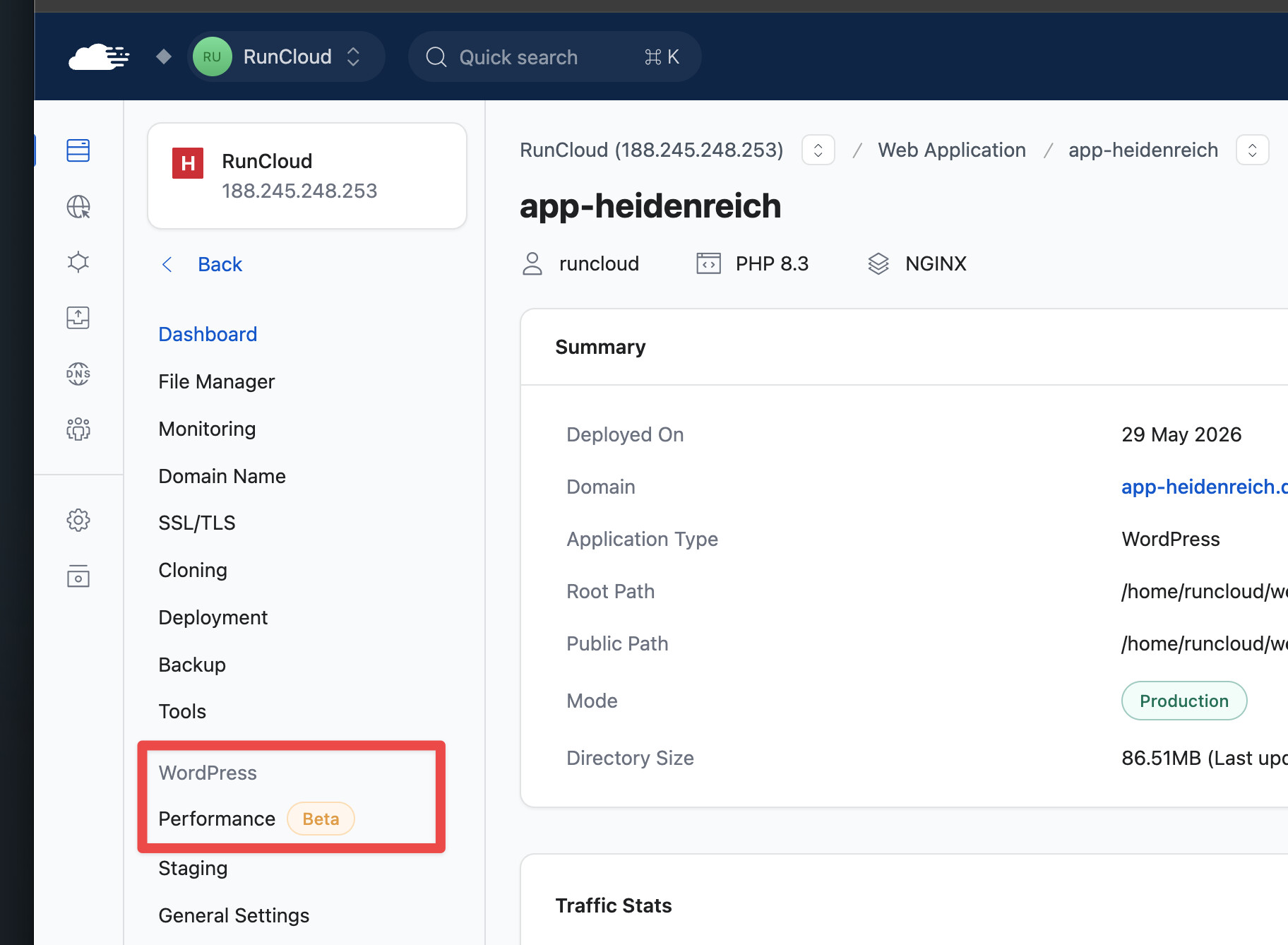
From there, navigate to your web application(s) of choice and to the Performance (Beta) tab or if you already have RunCloud Hub installed, to the RunCloud Hub tab, where you will be prompted to upgrade eligible web applications.
Great! Tried it on one WP site managed here and it does load faster than the previous cache plugin + Runcloud hub.
One bug - I gleefully found the BunnyCDN connection area - entered my API key, found the pullzone - but when saving the settings, it always ‘loses’ the pullzone. So for now instead, I’ve added the CDN via the manual option, and that is working wonderfully.
Thank you for reporting this. In the meantime, glad to hear that you managed to get it working with the Custom CDN option. I’ve made a note for our QA team to see if they can replicate the issue you’re referring to with BunnyCDN (and, if so, patch it + if not, I may have some follow-up questions to help debug).
In short, yes. Please give it a try. We’d love to hear your feedback.
Note: The default LScache plugin needs to be disabled for RunCache to work.
We worked with the LiteSpeed team on this (and do so in general). The idea is to build a solution that works better than the default LScache plugin because, when installed on a RunCloud-managed server, RunCache can better interact with the server, and we can ensure better out-of-the-box performance (having it pre-configured, etc.).
That said, LScache is a fantastic solution already, so if you’re super comfortable with it and the setup that you’ve developed with it, then 1) you should experiment with RunCache with no expectations (because your expectations will likely be quite high), but 2) your feedback will be all the more valuable to improving RunCache.
I would like to contribute if you’re willing to have a conversation and discuss it even further - maybe I can benefit from Cloudflare integration, if it manages cache-everything well. I have a large news website, with more than 100k posts and a lot of stuff always going on.
I had a long back and forth with support, and they were able to fix it, and in the process, I’ve learned that the plugin doesn’t work if your wordpress installation is in a subdirectory! I asked if they could fix this and was told that I should submit it as a feature request in the community forums here. I’m not sure if this counts as a feature request as much as a bug fix. Wordpress plugins are supposed to work with subfolder installations, and wordpress has built in pathways to establish correct absolute and relative paths.
Id like to use RunCache only for Object cache only as i have other (FlyingPress) for page caching.
If page cache is disabled, plugin in wordpress does not show any options redis. Also it would be neat if it compeletely configured automatically during initial setup. Password for redis was not set.
Also during my tests (while writing this) server and plugin started throwing error 504. Uninstalling runcache in rc fixed this issue.
@wearebrace Noted, thank you for reporting. Support is the best place for issues like this, as they can investigate how the issue is affecting your specific web application.
Thank you to everyone for your feedback so far.
The team is hard at work shipping improvements + getting feedback from early adopters helps accelerate this process significantly.
We’ve been seeing a tonne of 500 errors, but all of our sites WP Core sit in a subdirectory. At the moment this plugin is unusable for us. I like the idea of it, and for our setup it could work really well, but the Beta at the moment is causing more hassle than it’s worth right now.
Further to my last comment, about newsletter images, I have discovered it is an issue caused by the CDN options. If I disable CDN, the images in the email work.
I use FluentCRM, and have weekly newsletter emails automatically send out.
For some reason, when Runcache is enabled, the emails which link to recent posts on the site, and show featured images (webp) are unable to display the images. As soon as Runcache is disabled, the problem disappears.
I’ve not experienced this with other caching plugins.
I haven’t been in touch with support at the moment due to things being really busy for me at the moment. And I am also not installing this via the RunCloud dashboard, but am installing the plugin manually using our own Composer repo. I am not sure if the plugin that you are distributing via the docs found here is as up to date as the one that is installed via the dashboard. The thing for us is that we use quite a bespoke WordPress set up where we manage all plugin installations via Composer (similar to Roots Bedrock), so we don’t want to be installing plugins via the RC control panel.
Your assumption here is correct. It is not the correct version to install if you are installing RunCache on a server that is connected to RunCloud. That version is the general-purpose solution designed to be hosting provider agnostic.
I’ve just updated that help doc to remove the link (as it seems to have been the source of some confusion).
Thank you for reporting this.
I recommend removing the existing version of the plugin and reinstalling it from the RunCloud dashboard. I imagine this will solve the majority (if not all) of the issues you’re experiencing.
Let me know if there’s anything else we can help with.